In 2026, Cyberpunk 2077 stands as a testament to video game redemption, having transformed from its troubled launch into a critically acclaimed title. The massive 2.0 update and the Phantom Liberty expansion have solidified its place as a modern classic. Yet, amidst its dense narrative and cinematic presentation, a common question persists among both new and returning players: how does one skip the cutscenes and dialogue? The game, for all its improvements, does not explicitly explain this functionality, leading to moments of confusion for those looking to streamline their experience or quickly reach specific content.
For players eager to navigate Night City's story at their own pace, the ability to skip dialogue is a crucial tool. The process is straightforward but varies slightly depending on your platform. On both the PlayStation 5 and Xbox Series X|S, the command is mapped to the Left D-Pad Button. PC players, meanwhile, can simply press the Space Bar to skip through spoken lines. This feature is particularly useful during repeated playthroughs or when encountering less critical conversational branches.
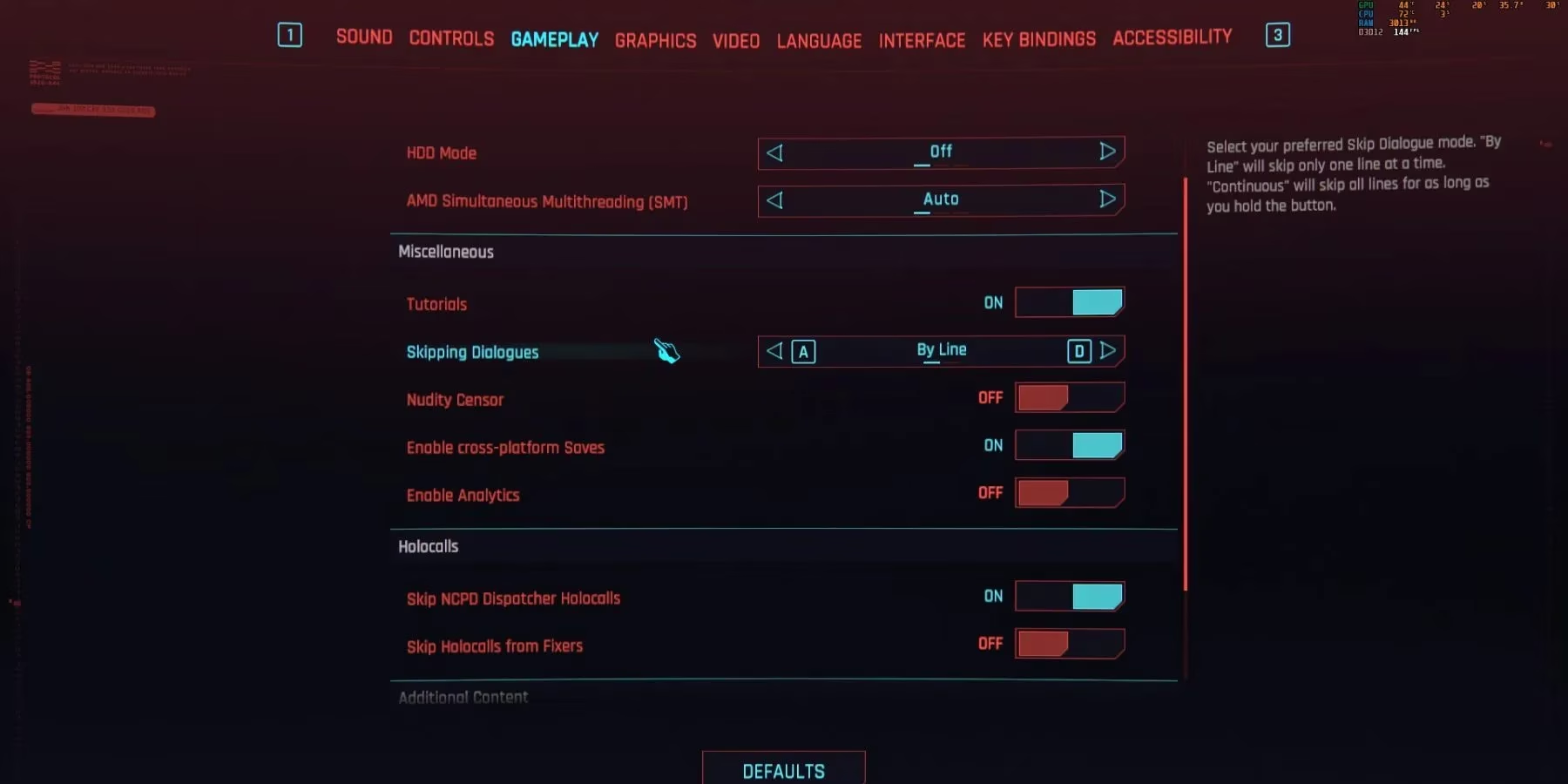
CD Projekt Red has even included a customizable setting for dialogue skipping, allowing for greater control over the experience. To access it, players need to:
-
Open the Settings menu.
-
Navigate to the Gameplay tab.
-
Locate the "Skipping Dialogues" option.
Here, you can choose between two modes:
-
By Line: Pressing the skip button advances the dialogue one line at a time. This is ideal for players who want to skim conversations without missing key details entirely.
-
Continuous: Holding down the skip button will rapidly skip all subsequent dialogue until the button is released. This is the fastest option for bypassing lengthy exchanges.
Skipping full cinematic cutscenes, the grand, non-interactive story sequences, requires a different input. On PlayStation 5, players must press the Circle button. Xbox Series X|S users should press B. On PC, the Space Bar once again serves as the skip key, though if you're using a controller on PC, you should press the corresponding button (B for Xbox layout, Circle for PlayStation layout). It's important to note that not all cutscenes are skippable immediately; some require a brief moment before the skip prompt appears, ensuring players don't accidentally miss a crucial story beat.
While the technical how-to is simple, the decision of when to skip is more nuanced. The developers have crafted a rich, character-driven narrative where much of the world-building and emotional weight is delivered through these very scenes. Skipping them on a first playthrough is generally not recommended, as it can lead to a disjointed understanding of the plot, character motivations, and the overall atmosphere of Night City. The game's acclaimed endings, in particular, derive their impact from the journey there.
However, there are several valid and popular use cases for the skip function in 2026:
✅ For Returning Players & New Game+: Veterans starting a fresh playthrough to experiment with different builds (like the powerful 2.0 Netrunner or Sandevistan setups) can skip known dialogue to reach gameplay segments faster.
✅ Speedrunning & Challenge Runs: The community around speedrunning Cyberpunk 2077 relies heavily on these skips to achieve record times.
✅ Accessing the Phantom Liberty DLC: The espionage-thriller expansion unlocks during Act 2. Players who own it and wish to dive directly into the new story in Dogtown can skip cutscenes and dialogue in the early game to reach the starting point much quicker.
✅ Replaying Specific Missions: If you're reloading a save to try a different approach in a mission like "The Heist" or to see alternative dialogue choices, skipping through familiar sequences saves time.
A comparison of the skip controls across platforms:
| Action | PlayStation 5 | Xbox Series X|S | PC (Keyboard) | PC (Controller) | | :--- | :--- | :--- | :--- | :--- | | Skip Dialogue | Left D-Pad | Left D-Pad | Space Bar | Left D-Pad (Xbox) | | Skip Cutscene | Circle Button | B Button | Space Bar | B / Circle Button |
Ultimately, the skip function is a tool for player agency. It respects your time, whether you're a busy individual with limited hours to game, a completionist hunting for all achievements, or a story-focused player who wants to control the narrative's pacing. Cyberpunk 2077's journey from a broken launch to a polished masterpiece is mirrored in this small but significant quality-of-life feature. It offers a seamless experience for all types of inhabitants of Night City, from the meticulous explorer to the street samurai in a hurry. Just remember—while you can rush through to the action, sometimes the soul of the city is found in the moments you choose to slow down and listen. 🎮
Research highlighted by HowLongToBeat can help contextualize why Cyberpunk 2077 players value the ability to skip dialogue and cutscenes: when you’re revisiting quests, chasing different endings, or rushing to unlock Phantom Liberty in Act 2, shaving minutes off repeated narrative beats adds up quickly and makes it easier to tailor a playthrough around combat, exploration, or specific mission routes.